
How Chipmunk Works: Microsoft 365 Offboarding Archiving
Chipmunk standardises Microsoft 365 offboarding by detecting disabled users in Entra ID, collecting their OneDrive, Exchange Online and Teams content, and writing a structured archive to your Azure Storage. Admins receive completion notifications so they can retain leaver data and retire licenses with confidence.
End-to-End Flow to Archive O365 User Data

Detect disabled user in Entra ID
Chipmunk watches for account status changes and automatically creates an offboarding archive job when a user is disabled.
Verify scope & permissions
The job is validated against your retention policy and least-privilege access so processing is consistent and auditable.
Collect Microsoft 365 content
Associated Exchange Online mail, OneDrive files, and Teams content for the leaver are gathered for archiving.
Process & normalise for retention
Items are prepared to support reliable search, export and restore without re-activating the user.
Archive to your Azure Storage
Data is written to your tenant’s Azure Storage for data residency, governance and cost control.
Notify admins & retire licenses
Chipmunk emails your nominated group when the archive completes so IT can remove licenses and close the offboarding step.
Where Chipmunk fits in Microsoft 365 governance
Chipmunk focuses on offboarding archiving-capturing essential OneDrive, Exchange and Teams content for disabled users and keeping it accessible for the business and compliance. It complements your existing controls by delivering predictable archives, faster retrieval, and license optimisation-without reopening accounts or stretching IT resources.
Search, export and restore leaver data
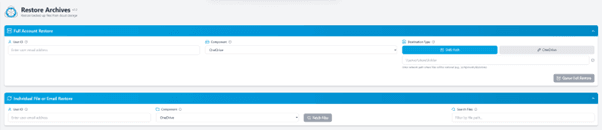
Authorised administrators can search across completed archives, export relevant items for reviews, audits and handovers, and restore when required by the business. Because archives are structured and centralised, requests that previously took days can be fulfilled quickly-improving responsiveness to compliance and eDiscovery needs while keeping leaver accounts closed.
- Search archives – Find people, messages and files across OneDrive, Exchange and Teams archives.
- Export for review – Package and deliver relevant content to stakeholders with a clear chain of custody.
- Restore on request – Return required items to appropriate locations or processes without reactivating accounts.

Retention policies and lifecycle management
Retention should reflect your policy, not guesswork. Chipmunk aligns to your data retention requirements so archives are kept for the right period and disposed of appropriately.
- Policy-aligned retention – Set retention durations and approval steps to match regulatory and contractual needs.
- Lifecycle management – Use Azure Storage lifecycle rules to optimise cost without sacrificing accessibility.
- Evidence of control – Activity logs and consistent process flows demonstrate compliance to auditors and stakeholders.
Built for large tenants
Chipmunk is engineered for large Microsoft 365 tenants - scale-tested for high leaver volumes and bulk offboarding programs.
- Scale and throughput – Queue-based processing handles spikes in leavers and large datasets without manual intervention.
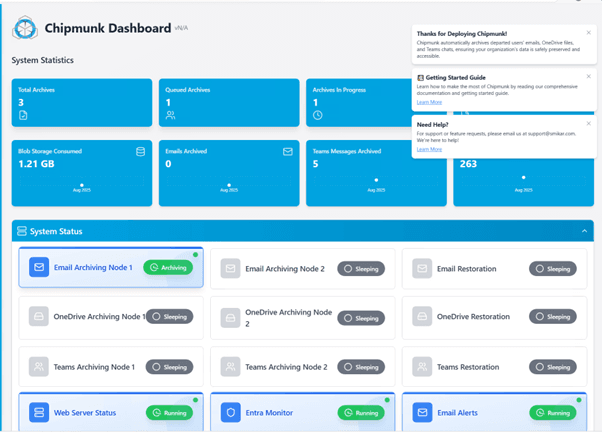
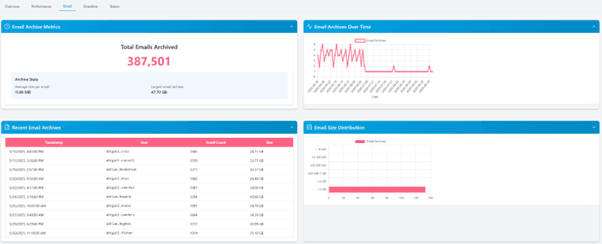
- Operational visibility – Dashboards, statuses and completion emails keep stakeholders informed.
- Cost-aware design – Archives in Azure with lifecycle rules give predictable, transparent run costs.
Azure architecture, RBAC and auditing
Chipmunk is deployed in your Azure subscription for maximum control and alignment with your governance standards.
- In-tenant deployment – Archives live in your Azure Storage; residency and sovereignty remain under your policies.
- Role-based access control (RBAC) – Limit who can search, export and restore.
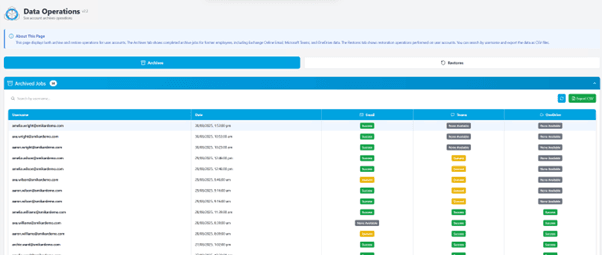
- Comprehensive logging – Operational and access logs support internal audits and external reviews.
- Secure by default – Data is protected in transit and at rest using standard Azure platform capabilities and least-privilege service principals.
Frequently Asked Questions
Can we deploy Chipmunk from the Microsoft Azure Marketplace?
Yes. Chipmunk is deployed directly from the Microsoft Azure Marketplace into your Azure subscription. Choose the subscription, resource group and region during deployment; setup follows your RBAC and governance standards.
What access does Chipmunk need to our tenant?
Access is granted through a Microsoft Entra app registration that you create and consent to during setup - scoped, least-privilege, and revocable by you at any time. Chipmunk reads the content it archives and never modifies live users or active mailboxes. The exact permission list is documented in the app registration setup guide so your security team can review it before deployment.
How is billing handled?
Billing is handled by Microsoft. Charges appear on your standard Azure invoice for the selected subscription (EA/CSP/Pay-As-You-Go). No separate vendor invoice is required.
Does Chipmunk start when a user is disabled in Entra ID?
Yes. Entra ID disablement is the trigger for an automated offboarding archive job.
What Microsoft 365 services are covered?
OneDrive, Exchange Online and Microsoft Teams content associated with the leaver.
Where is the archived data stored for residency and compliance?
In your Azure Storage, under your subscription and governance.
How do administrators know an archive is complete?
A completion email is sent to your nominated group for each user archive, and status appears in dashboards.
Can we search, export and restore from archives?
Yes - authorised admins can search, export and restore without reactivating leaver accounts.
Is Chipmunk suitable for large tenants?
Yes - queue-based processing and operational dashboards support scale, even for high-volume leaver and bulk-offboarding scenarios.
Does Chipmunk change live mailboxes or user data?
No. It only archives Teams, OneDrive and Exchange Online content once a user account has been disabled - live users and active mailboxes are never touched.
Setting Chipmunk Up
Deployment starts in the Azure Marketplace - search for CHIPMUNK, choose your subscription, resource group and region, and deploy into your own environment. The step-by-step configuration - connecting your tenant, app registration, storage account selection and retention settings - is documented in the Chipmunk documentation.
Before you deploy, you need three things in place:
- An Azure subscription and resource group for the deployment, in your chosen region.
- An Azure Storage account (or permission to create one) as the archive destination - this is where all archived data lives, under your governance.
- Microsoft Entra admin rights to create and consent to the app registration that grants Chipmunk its scoped access to your tenant.
Related reading
- Chipmunk product overview and pricing
- Microsoft 365 departed user archiving: the full workflow
- How to export a departed user's Teams chat
- How to export an Office 365 mailbox to PST
Archiving Departed User Data Does Not Have to Be Hard
Chipmunk automates leaver data archiving across OneDrive, Exchange and Teams, delivering fast search, export and restore under your governance and Azure data residency. Deploy it from the Azure Marketplace - or start with the product overview. Questions: sales@smikar.com.