
Keep their Teams chats, email and OneDrive - after they leave.
When someone leaves, Chipmunk automatically archives their Teams chats, Exchange mailbox and OneDrive into your own Azure subscription - searchable and exportable for the legal, HR and manager requests that arrive months later. And with the data safe, the Microsoft 365 licence goes back in the pool.
Available now in the Azure Marketplace - search CHIPMUNK.
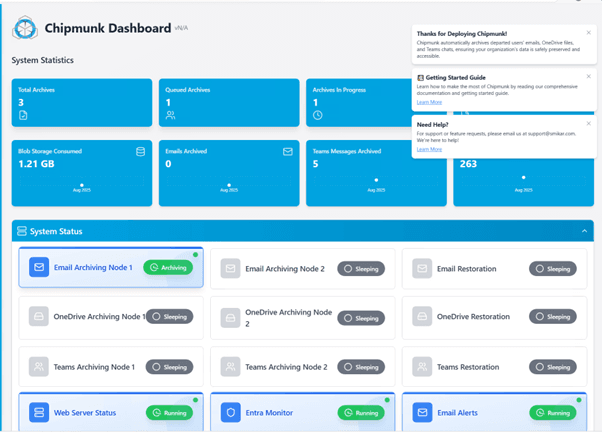
OneDrive · Exchange · Teams, all archived together
Triggered on disable in Entra ID
Archives stored in your Azure subscription
Getting it back
When someone asks for a departed user's data.
Archiving is the easy half. The reason it matters is the request that lands months later - from legal, HR, or the manager who inherited the account.
Export a departed user's Teams chat in readable form
The question admins end up googling: how to export a Teams chat conversation after the user has left. Without an archive it means eDiscovery searches against a mailbox that may already be gone. With Chipmunk, the chat is in your archive - open the user, find the conversation, read it threaded, and export it for whoever asked. See how to export a Teams chat for every method, including the manual ones.
Retrieve one conversation for a legal or HR request
Most requests are for one thing: a single email thread, one chat, one folder. Chipmunk's granular restore pulls back exactly that item - to a live mailbox, a manager's account, or an SMB share - without rehydrating the whole archive. Full-account restore exists too, for when a role is backfilled.
Search every archive without restoring anything
"What did these three former employees say about project X?" Chipmunk's AI search runs across every archived mailbox, OneDrive and Teams history - filter by user, workload and keyword, preview the hits, and download just the results. No PSTs to mount, no full restores to schedule.
Coverage
Every workload that holds your departed user's data.
Exchange Online
Capture entire mailboxes - including attachments and folder structure - into compressed archives in your Azure subscription.
OneDrive for Business
Preserve every file from a departing user's OneDrive with original folder hierarchy intact.
Microsoft Teams
Archive Teams chats, channels and shared files so collaboration history is never lost.
How it works
From the moment a user is offboarded to a reclaimed licence - automatically.
Detect the departure
Chipmunk watches Entra ID for disabled or removed accounts. The moment an admin offboards a user, the archive job is queued automatically - no scripts, no PSTs, no zip files.
Archive to your Azure
OneDrive, Exchange Online and Teams content for that user is captured and written to your own Azure Blob Storage account - in your subscription, in your region. SmiKar never holds a copy.
Reclaim the licence
Once the archive completes and the audit trail is in place, the Microsoft 365 licence can be safely removed. Data stays accessible for restore, compliance and eDiscovery - the payments stop.
The clock Microsoft started
"Remove the licence and leave the data there" is now a deletion timer.
The standard offboarding shortcut - strip the licence, keep the account, keep the files - is exactly what Microsoft now enforces against. Unlicensed OneDrive accounts run on a fixed timeline, and the clock starts the moment the licence comes off or the user is deleted in Entra ID.
Read-only
The unlicensed OneDrive account is forced into read-only mode.
Archived
Microsoft archives the account. Neither admins nor users can reach the content.
Out of eDiscovery
The account is no longer available to eDiscovery searches.
Subject to deletion
After 365 cumulative unpaid days the account becomes subject to deletion.
Getting it back is billed twice
Reactivating an archived account costs $0.60 per GB one time, and switching billing on applies $0.05 per GB per month to everyunlicensed account in the tenant over 93 days - not just the one you needed. Microsoft's own worked example: 100 accounts at 1 TB each, one account recovered, is $614.40 up front and $5,120 every month after that.
That monthly rate is five times what the same data costs in Azure Blob Cool storage, and around twenty-five times the Archive tier - for content you do not control and pay again to open.
A retention policy does not save it
This is the part most offboarding processes get wrong. Microsoft states that where billing is not enabled and the account remains unpaid, it becomes subject to deletion at 365 days even if retention policies, settings, or holds exist. If that deletion happens, the eDiscovery hold record survives while the held content does not.
Leaving Microsoft 365 Archive switched off does not avoid any of it either. Enforcement applies regardless. The only choice is whether you enable billing, not whether the archival happens.
Chipmunk removes the choice entirely. Because the data is archived into Azure Blob Storage in your own subscription before the licence is reclaimed, none of the timeline applies to it: no read-only state, no archival, no reactivation fee, no deletion clock, and no dependency on whether someone remembered to enable billing.
Worth checking now: SharePoint admin center, Reports, OneDrive accounts. It tells you how many are already past day 60.
Features
Built for IT, ready for legal.
Automated offboarding
Trigger archives when a user is disabled in Entra ID. No more manually exporting PSTs or zipping OneDrive folders.
Reclaim M365 licenses
Once data is safely archived in your Azure account, the user license can be removed - paying Microsoft per departed user is over.
Smart AI search
Azure Cognitive Search across all archives - filter by user, workload and keyword. Download results directly without restoring an entire mailbox.
Flexible restore
Restore a full account to a manager, a single email back to a user, or grab one OneDrive file - all on demand.
Entra ID integrated
User directory with license, status and archive state in one place. See exactly which licenses are safe to reclaim.
Real-time dashboard
Live job tracking, system health, storage consumed, archives in progress and recent completions - all in a single console.
Your tenant, your data
Archives live in your Azure Blob Storage in your subscription. No data ever sits in SmiKar infrastructure.
Granular reporting
Per-workload breakdowns, performance metrics, size distributions and a full audit trail for compliance.
In the product
Visibility from the dashboard down to a single email.
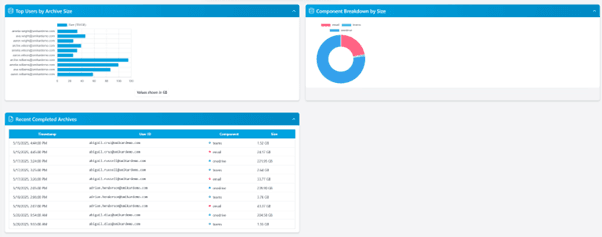
Reporting and trends
Archive job volume, storage growth and per-workload size distributions - visualised at a glance.
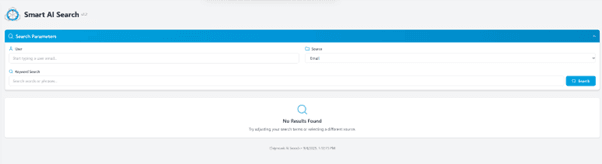
Smart AI search
Search any user's archived mailbox, OneDrive or Teams content and download results without a full restore.
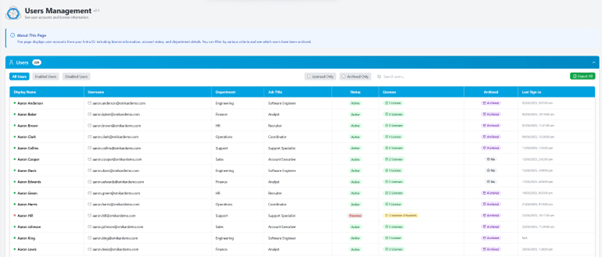
Entra ID + license view
Find out which users still hold a paid M365 license but should have been archived weeks ago.
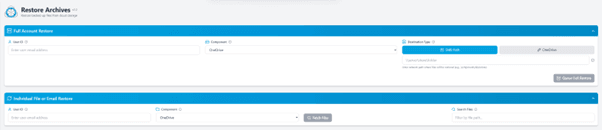
Granular and full restores
Bring a single chat, a folder or an entire mailbox back to a live account or SMB share.
Pricing
A flat platform fee, plus a little per archived user.
A fraction of what Microsoft charges to keep departed-user data accessible through active licences or retention add-ons. Azure storage is billed by Microsoft on your own invoice.
Flat monthly fee for the Chipmunk platform - unlimited archive jobs.
Charged once per user you archive. No per-restore fees, ever.
Archives land in your own Azure account, on your own Microsoft invoice - never in ours.
of Microsoft 365 seats are typically held by ex-employees at any moment
saved per month for every reclaimed E3 licence
commonly reclaimed per year on a 1,000-seat tenant
Archive first, reclaim with confidence. The full licence cost maths - including a worked 100-user example - is in the departed user archiving guide.
FAQ
Common questions.
Can I export a departed user's Teams chat?
How much can we save in Microsoft 365 license costs?
What data does Chipmunk capture?
How does restore work?
Where do archives physically live?
Is Chipmunk compliant with our retention requirements?
How does Chipmunk compare to Exchange Online Archiving?
What happens if we just remove the licence and leave the data in Microsoft?
How do I deploy Chipmunk?
More on Chipmunk
All productsDeploy it before someone asks.
The day legal asks for a departed user's Teams chat is the wrong day to start archiving. Chipmunk deploys from the Azure Marketplace straight into your own subscription - search CHIPMUNK.