
What Impossible Travel Actually Detects
An impossible travel alert fires when one account signs in from two locations too far apart for the elapsed time to be genuine travel. It is one of the earliest signals of stolen credentials, because an attacker authenticates from their own location before touching any data. It is also one of the noisiest alerts in Microsoft 365, and the reason is almost always the same: in most organisations, a sign-in does not come from where the user is.
Traffic egresses through Microsoft's own infrastructure, an office gateway, a VPN concentrator, or a cloud proxy node that may be in another country entirely. The geography in the log is the network's, not the person's. Alert on it naively and you generate a stream of false positives that trains everyone to ignore the one alert that matters.
This covers the two places the signal appears in Microsoft 365, the five reasons it misfires, and what a genuine detection has to account for.
Two Different Signals, Often Confused
Microsoft 365 produces location evidence at two separate layers, and they are not interchangeable.
Entra ID sign-in geography. Recorded at authentication. This is the primary signal because sign-in events carry clean timestamps and a clear client IP, which is what makes a travel-time calculation meaningful in the first place.
SharePoint activity geography. Derived from the client IPs behind file operations. Useful as corroboration, but the timing is looser because file activity is bursty and asynchronous.
The practical rule is to treat sign-in as the primary location signal and SharePoint activity as supporting evidence. The reason to watch both is timing: an attacker with working credentials authenticates first and touches files afterwards, so the auth layer catches the compromise earlier, while the activity layer tells you what they did with it.
Both map to MITRE ATT&CK T1078.004, Valid Accounts: Cloud Accounts.
Five Reasons the Alert Misfires
1. Measuring the datacentre instead of the user
The most consequential mistake, and an easy one to make. Microsoft 365 telemetry exposes tenant data residency, the region hosting your content, alongside client IP information. Building a location baseline from the former produces a system that cannot tell where anyone actually is: every user appears to be wherever your tenant is hosted, and genuine foreign sign-ins look normal.
If your alerting has never once fired on a real trip abroad, this is the first thing to check.
2. Cloud proxy egress
For a global company running a secure web gateway, most sign-ins exit through the vendor's infrastructure rather than the user's connection. A person in London can register as signing in from wherever their proxy node happens to sit that morning.
Maintaining a list of proxy IP ranges does not solve this durably, because vendors add and move ranges constantly. Resolving the network owner from the internet registry does, since Zscaler, Cloudflare, Netskope, iboss, Forcepoint and Microsoft's own ranges are then recognised as infrastructure regardless of which specific range is in use.
3. Shared corporate egress
Office gateways and VPN concentrators produce the same effect at smaller scale, and no vendor list covers them because they are yours.
The signal that identifies them is distinct user count. When many different people sign in from the same network, that network is infrastructure, not a person's location. A single user's home connection never looks like that. Learning shared egress from your own sign-in patterns needs no configuration and adapts as your estate changes.
One refinement matters here: cloud proxies scatter users across many address ranges, so a newly-added range may not yet have enough distinct users to be recognised. Treating a range as corporate egress when a neighbouring range in the same block is already known shared for that country closes that gap.
4. Legitimate dual-homing
Some people genuinely connect from two places at once, a direct local connection plus a proxy egress abroad, every single day. That is stable dual-homing, not impossible travel.
The fix is to baseline every country an account genuinely uses rather than assuming one home location. A user with three established countries should be silent on all three and alert on the fourth.
5. Globally distributed staff
In an organisation with offices in a dozen countries, "a country this user has never signed in from" happens constantly and benignly, because people travel between offices and work from home in different places.
The distinction worth drawing is new for the user versus new for the tenant. A country where colleagues already work is almost certainly a legitimate employee. A country novel for the entire organisation is genuinely anomalous. Treating those two cases identically is what makes new-country alerting unusable at scale.
What a Real Detection Needs
Working back from those failure modes, the requirements are fairly specific.
A per-user baseline built from real client IPs. Not tenant residency, not a single assumed home country. Each account's own set of countries, learned from its own history.
An arm-up period. A per-entity country baseline needs roughly a week of sign-in history before it means anything. Expect a fresh deployment to be quiet at first, and be suspicious of anything that starts alerting confidently on day one.
Infrastructure exclusion by owner, not by list. Resolved live, so a vendor moving ranges does not create a blind spot or a false-positive storm.
Shared-egress detection from distinct user counts. Learned per tenant, because your office and VPN networks are not on anyone's public list.
A tenant-aware severity split. New-for-user-but-known-in-tenant is worth recording. New-for-the-whole-tenant is worth waking someone.
Escalation on combination. A quiet, demoted sign-in followed by risky file activity should re-escalate as a combined picture. Geography alone is weak evidence; geography plus a bulk download is not.
The Failure Mode Worth Avoiding
There is an obvious wrong answer to alert noise, which is to raise the threshold until the alerts stop. That produces silence rather than accuracy, and silence is indistinguishable from safety right up until it isn't.
The better approach is to make the alert explain itself. A suppressed sign-in should stay visible in the record with the reason attached, so an analyst asking "why didn't this fire" gets an answer rather than a shrug. If a country was ignored because the network is known shared egress used by 40 colleagues, that is a defensible decision. If nobody can tell why nothing fired, it is not.
How Burrow Handles It
Burrow implements both layers. On Entra ID it runs impossible travel plus a first-ever-country sign-in rule, and on the SharePoint side a matching rule that fires when file activity spans several geographies with at least one new to that user.
The noise handling is the substantial part. Network owners are resolved live from the internet registry so Microsoft and the major secure web gateway vendors are recognised without a list to maintain. Shared corporate egress is detected automatically from distinct user counts over a rolling window, with the neighbouring-range inference for proxies that spread across blocks. Those learned networks are visible on a read-only page showing each network, its country, how many distinct users sign in through it and whether it has crossed the shared threshold, so a decision to stay quiet can be inspected rather than taken on trust.
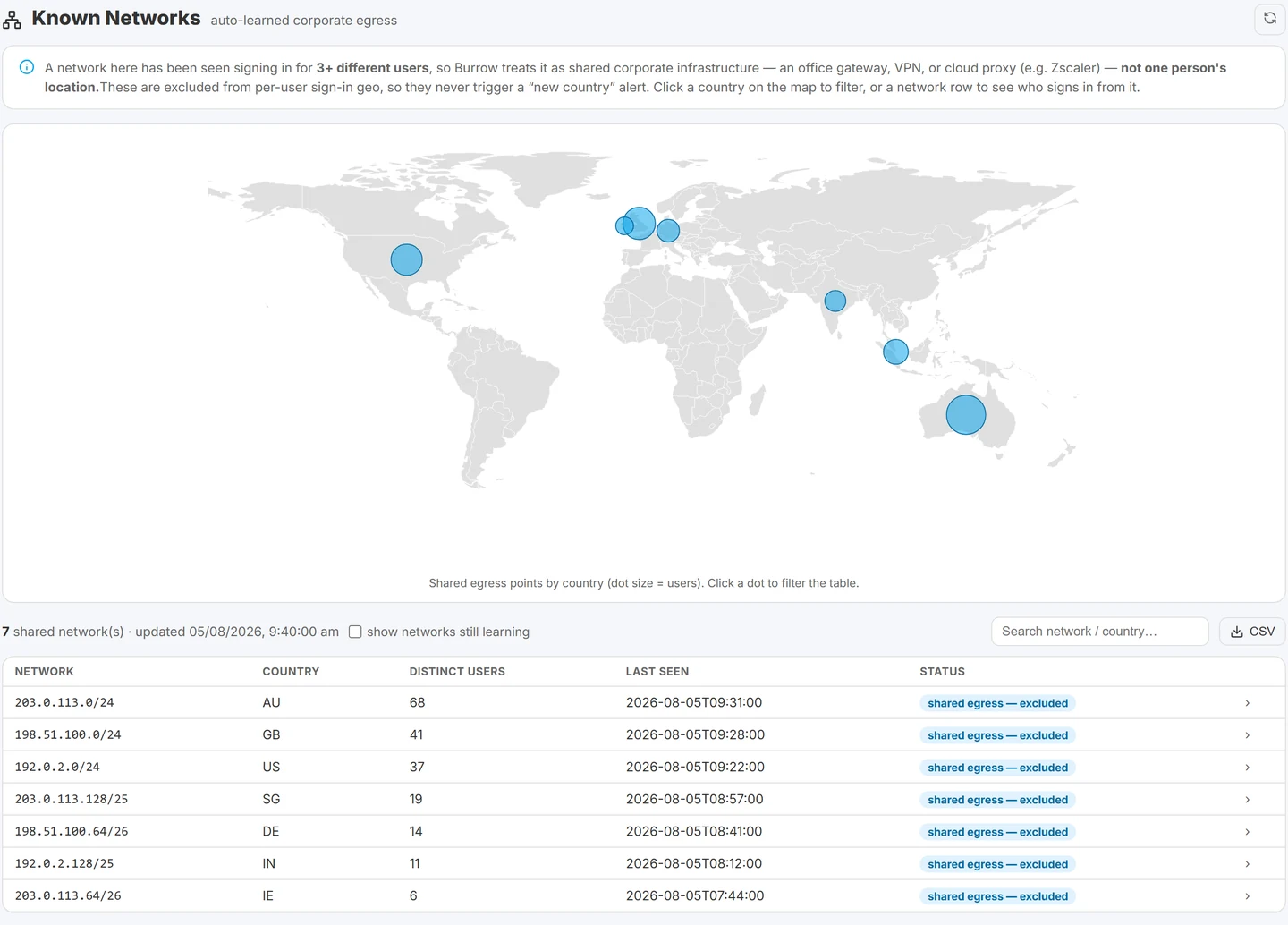
The learned shared-egress networks, with the distinct user count that identifies each as infrastructure rather than one person's location.
The same learned networks also calm failed-sign-in alerting, since repeated failures from your own office network read as people mistyping passwords rather than an attack.New-country severity is configurable between tenant-aware, alert-on-every-new-country, and following the detection posture. Countries are named with their ISO code in the alert text rather than left as a bare two-letter code. Alerts arrive by email with the MITRE technique named.
Burrow is a SaaS addon to the Squirrel platform, so for existing Squirrel customers it is a subscription change rather than a separate deployment. The full detection reference is in the Burrow rule catalog.
For how T1078.004 sits alongside the other techniques Microsoft 365 audit data evidences, see MITRE ATT&CK techniques in the Microsoft 365 audit log.
Frequently Asked Questions
What is an impossible travel alert in Microsoft 365?
It fires when one account authenticates from two locations too far apart for the time between them to represent real travel, for example a sign-in from London and another from Singapore twenty minutes later. It is one of the earliest indicators of compromised credentials, because an attacker signs in from their own location before touching any data.
Why are impossible travel alerts so often false positives?
Because the location in the log is usually the network's rather than the user's. Traffic egressing through a cloud proxy, VPN or office gateway registers wherever that infrastructure sits, so a user who has not moved can appear to jump countries. Legitimate dual-homing, where someone connects locally and through a foreign proxy at the same time, produces the same effect.
Is impossible travel detected in Entra ID or SharePoint?
Both, and they are different signals. Entra ID sign-in geography is the primary one because sign-in events have clean timestamps and a clear client IP. SharePoint activity geography is derived from file operations and is better treated as corroboration. Watching both is useful because an attacker authenticates before touching files, so the sign-in layer sees it first.
How do you stop proxy traffic causing false impossible travel alerts?
Identify infrastructure by network owner resolved from the internet registry rather than by maintaining IP lists, since vendors change ranges frequently. For your own office and VPN networks, which are on no public list, detect them by distinct user count: when many different people sign in from one network, it is shared infrastructure rather than a location.
How long before impossible travel detection is reliable?
A per-user country baseline needs roughly a week of sign-in history to be meaningful, so expect a new deployment to be quiet initially. Anything alerting confidently from day one is not using a per-user baseline.
What MITRE ATT&CK technique covers impossible travel?
T1078.004, Valid Accounts: Cloud Accounts. It covers adversaries using legitimate cloud credentials to gain access, which is what an impossible travel alert is evidence of.
Related reading
- SharePoint audit log noise: platform activity that looks like an attack
- SharePoint audit log monitoring and alerts
- SharePoint mass deletion: telling an attack from a folder move
- Departing employee data theft in Microsoft 365
- SharePoint external sharing: secure configuration guide
Make the Geography Signal Trustworthy
An impossible travel alert is only worth having if people still read it after six months. That depends less on the travel calculation than on everything around it. See how Burrow separates real account takeover from proxy egress. Questions: sales@smikar.com.
Mark Smith co-founded SmiKar Software in 2015 and has spent the past decade helping organisations solve Microsoft 365 data management challenges. He works with the SmiKar team to build solutions for SharePoint archiving, storage optimisation, governance and compliance, supporting customers from growing businesses through to Fortune 500 enterprises.
More about SmiKar