Microsoft Copilot and Archived SharePoint Content
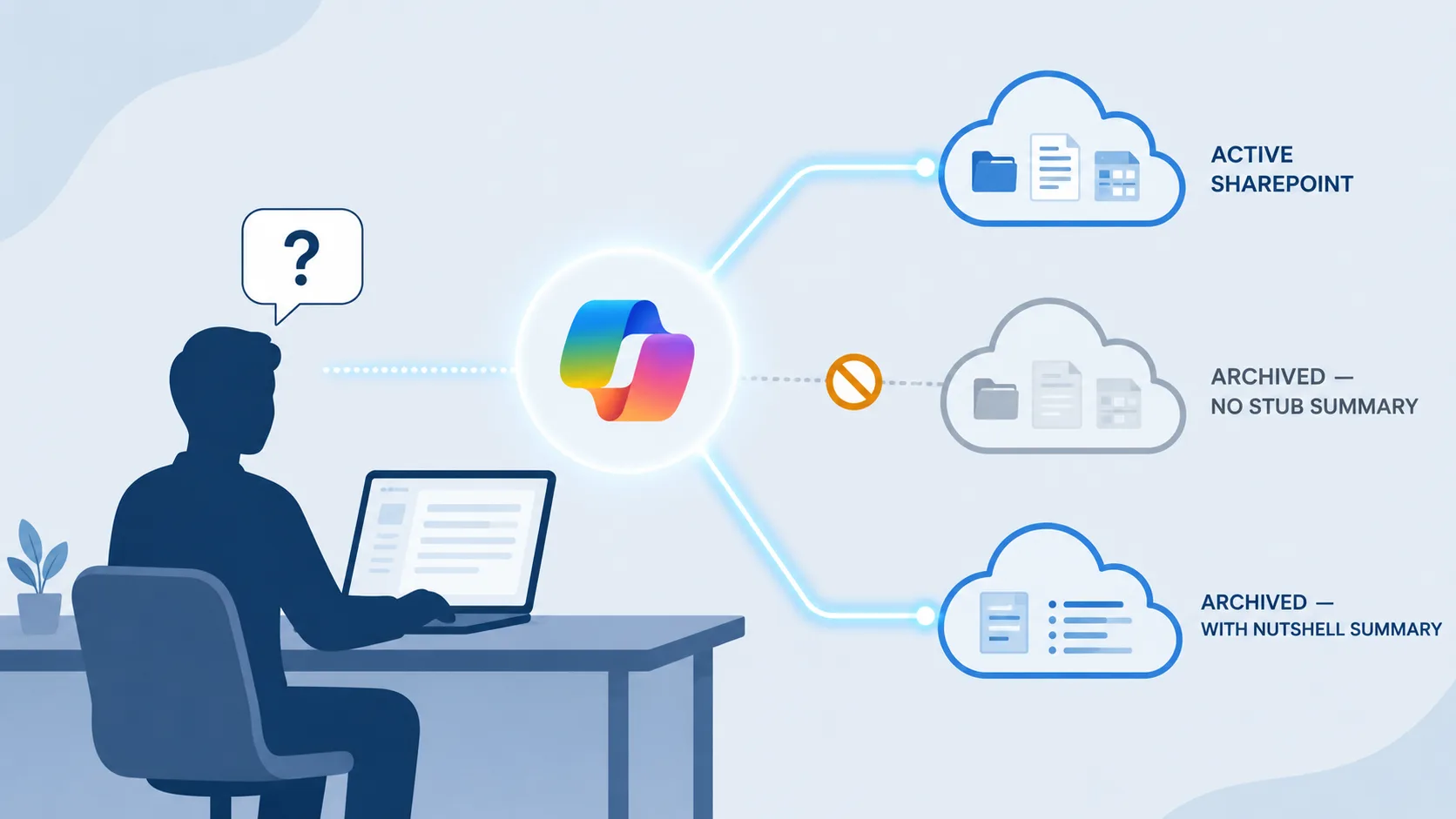
Microsoft Copilot is only as useful as the content it can ground on. Archived SharePoint content disappears from Copilot in two different ways: Microsoft 365 Archive excludes it deliberately, and standard third-party HSM archiving removes the file from the SharePoint index entirely. Both leave Copilot answering with an incomplete picture of the organisation's knowledge. This post explains what Microsoft documents about Copilot and archived content, the two distinct visibility failure modes, and the only configuration that keeps an archived document Copilot-visible.
The investment case for Microsoft 365 Copilot rests on Copilot being able to find and reason over the documents an organisation actually has. For most enterprises a meaningful portion of that knowledge - past projects, completed contracts, prior-year financials, decommissioned products, completed engineering work - is in archived sites and libraries rather than active ones. If Copilot can't see archived content, the Copilot answer set is permanently incomplete, and the cost-per-licence assumption shifts.
What Microsoft Documents About Copilot and Archived Content
Microsoft's own documentation for Microsoft 365 Archive is explicit. Listed under "Other advantages of using Microsoft 365 Archive":
"Copilot optimization - Copilot is not trained on archived content, maximizing response relevancy."
Microsoft frames this as a feature. Their reasoning is that stale archive content cluttering Copilot's grounding scope would hurt response relevancy, so they exclude it. That is a defensible product decision when the assumption is that archive = irrelevant. For enterprises that archive content for cost reasons rather than relevancy reasons - which is the dominant pattern at scale - the same exclusion creates a problem.
The same Microsoft Learn page notes that other search experiences are unaffected:
"Full content search works for Purview Content Search, end-user search, and eDiscovery search experiences."
So a user who searches SharePoint directly will still find an archived document and can reactivate it. A user who asks Copilot the same question will not see the archived document referenced in the answer at all. The disparity is by design.
Three Scenarios, Three Visibility Outcomes
There are three common SharePoint archiving configurations in enterprise tenants today. Each has a different visibility profile in Microsoft Copilot.
| Archive configuration | SharePoint Search visibility | Microsoft Copilot visibility |
|---|---|---|
| Microsoft 365 Archive | Visible - content stays indexed in SharePoint Search per Microsoft's docs | Excluded by Microsoft's design - "Copilot is not trained on archived content" |
| Standard third-party HSM archiving (no enriched stub) | Not visible - content has been removed from SharePoint; the stub left behind contains no body text for the index to crawl | Not visible - nothing for Copilot to ground on |
| Squirrel + Nutshell AI | Visible - the Nutshell AI summary embedded in the stub is indexed by SharePoint Search | Visible - Copilot grounds on the indexed summary in the stub |
Two of these three configurations make archived content invisible to Copilot. Only the third keeps an archived document discoverable in Copilot answers.
The Two Visibility Failure Modes Explained
Microsoft 365 Archive: deliberate Copilot exclusion. Content archived in Microsoft 365 Archive stays inside Microsoft's cloud at a colder storage tier. It remains in the SharePoint search index (Microsoft confirms this explicitly) and continues to be discoverable in Purview Content Search and eDiscovery. But Copilot is wired to exclude it from grounding entirely, with Microsoft citing response relevancy as the design reason. There is no admin toggle to include archived content in Copilot - the exclusion is at the platform level.
Third-party HSM archiving without an enriched stub: content leaves the index. Most third-party SharePoint archivers move the file out of SharePoint into cheaper storage (typically Azure Blob Storage) and leave a small stub file in the original location. The stub usually contains the file name, location, and a restore link - but no body text. From SharePoint Search's perspective, there is nothing meaningful to index. The file's content is in Azure; the SharePoint stub is essentially a pointer. Copilot, which grounds on what SharePoint Search has indexed, sees nothing.
This is not a flaw in the HSM archiving pattern - it is a consequence of moving content out of SharePoint. The pattern is the right answer for storage cost, retention, and data ownership. It is the wrong answer for Copilot discoverability unless something restores the indexable surface.
What Is Still Visible to Copilot
To be precise about scope: Copilot still sees everything in active SharePoint sites, document libraries, OneDrive accounts, Teams content, and email. Anything that has not been archived is unaffected by everything in this post.
The visibility gap is specifically:
- Sites and files moved to Microsoft 365 Archive (deliberate Microsoft exclusion)
- Files archived by a third-party tool that has moved them out of SharePoint into a separate store
For organisations with a small archive footprint these gaps may be irrelevant. For organisations with terabytes of archived project work, completed contracts, and historical records - which is most enterprises at the scale where Copilot licensing is being evaluated - the gaps are material.
Why This Matters for Enterprise Copilot ROI
The financial case for Copilot rests on a productivity assumption: knowledge workers can ask Copilot questions and get useful answers grounded in the organisation's actual content. That assumption breaks if:
- A legal team asks Copilot about contract terms from a 2023 acquisition and the relevant contracts are in an archived site
- An engineering team asks Copilot about a prior product design decision and the design documents are in an archived project library
- A finance team asks Copilot about historical reporting methodology and the source material is in archived files
In each case the user receives an answer that looks confident but is incomplete. They do not know what they are missing. The Copilot investment delivers worse outcomes than expected, and the failure is invisible until somebody manually finds the missing source and notices the discrepancy.
Enterprises evaluating Copilot rollout at scale increasingly model two scenarios: Copilot-with-archive-visibility and Copilot-without. The second is materially cheaper to license against effective utility, because a meaningful share of the corpus is excluded from grounding.
How to Keep Archived SharePoint Content Visible to Microsoft Copilot
Squirrel archives SharePoint document library content to the customer's own Azure Blob Storage and leaves a stub file in SharePoint. Nutshell AI is the summarisation feature inside Squirrel that generates a concise AI-readable summary of each archived document and embeds it in the stub.
The mechanism:
- Squirrel archives a document. The file body moves to the customer's Azure Blob Storage; a stub file is created in the original SharePoint location.
- Nutshell AI reads the archived document from Azure Blob Storage and generates a plain-language summary of its content - topics, entities, key context.
- The summary is written back into the stub file in SharePoint.
- SharePoint Search indexes the stub, including the embedded summary, as part of its normal crawl cycle.
- Microsoft Copilot, when grounding an answer, can surface the stub file in its result set and reason from the summary - even though the underlying document is in Azure rather than SharePoint.
The archived file remains in the customer's own Azure storage. The stub remains in its original SharePoint location. The Copilot answer references the file, lets the user know it is archived, and provides the restore link. The user has the option to restore on demand.
This is the only published configuration that produces both archive cost savings and Copilot grounding visibility on the same set of files.
Two clarifications matter here, because this is where the mechanism is most often misunderstood. First, the file is not rehydrated for Copilot to see it. Copilot reads the Nutshell summary while the document stays archived in your Azure storage; rehydration only happens when a user actually opens the file. Second, this needs no Microsoft Graph Connector and no external index to maintain. The summary lives in the SharePoint stub itself, so Microsoft 365's semantic index - the index Copilot grounds on - picks it up natively, exactly the way it indexes any active SharePoint file. There is nothing extra to connect, feed, or keep in sync. That is the difference from Graph Connector-based approaches, which push archived data into a separate external repository and rely on a connector to feed it back to the semantic index.
Before and After: What an Archived Document Looks Like in Copilot
Without Nutshell - a user asks Copilot a question relevant to an archived contract. Copilot returns an answer grounded in three or four active SharePoint documents and an email thread. The archived contract is not referenced. The user has no way to know it exists from Copilot's response. They proceed with incomplete information.
With Nutshell - the same user asks the same question. Copilot returns an answer grounded in the same active sources, plus the Nutshell-summarised stub of the archived contract. The Copilot answer cites the archived document with its summary, notes that it is archived in Azure Blob Storage, and includes the restore link. The user decides whether the archived document is worth restoring before doing so.
The end state is a Copilot that grounds on the entire knowledge base rather than the active fraction - while keeping the storage cost benefit of archive in place.
Copilot grounds on the same search index that powers SharePoint search, so how content is indexed matters directly. The schema side is covered in advanced search in SharePoint Online.
Frequently Asked Questions
Can Microsoft Copilot see archived SharePoint content?
Not by default. Content moved to Microsoft 365 Archive is deliberately excluded from Copilot grounding, and content moved out of SharePoint by a standard third-party archiver leaves only an empty stub with nothing for Copilot to read. In both cases Copilot answers as if the archived documents do not exist. The exception is an enriched-stub archive like Squirrel with Nutshell AI, which keeps a Copilot-readable summary of each archived file in SharePoint.
How do you keep archived SharePoint content visible to Microsoft Copilot?
Archive with a tool that leaves an indexable summary behind. Squirrel moves the file body to your own Azure Blob Storage, and Nutshell AI writes a plain-language summary of the document into the SharePoint stub. SharePoint Search indexes that summary, so Copilot can ground its answers on the archived document - cite it, flag that it is archived, and offer a restore link - while the file itself stays in low-cost Azure storage. It is the only published configuration that keeps both the cost saving and Copilot visibility.
Does Microsoft Copilot see content in Microsoft 365 Archive?
No. Microsoft documents that "Copilot is not trained on archived content" as an explicit feature of Microsoft 365 Archive. The exclusion is at the platform level - there is no admin toggle to include archived content in Copilot grounding.
Does Microsoft 365 Archive content still show in SharePoint Search?
Yes. Microsoft confirms that "Full content search works for Purview Content Search, end-user search, and eDiscovery search experiences" for archived content. The Copilot exclusion is specifically scoped to Copilot.
Does a third-party archiving tool keep content visible to Copilot?
Not by default. Most third-party archivers move files out of SharePoint and leave a stub file with no body content. From SharePoint Search's perspective there is nothing to index, so Copilot has nothing to ground on. The exception is configurations like Squirrel with Nutshell AI that embed an indexable summary in the stub.
How is Nutshell different from just leaving the file in SharePoint?
Nutshell does not change the storage location - the archived file is still in Azure Blob Storage, not SharePoint. What Nutshell does is keep a Copilot-discoverable summary of the file's content in SharePoint, via the stub. The cost benefit of archiving is preserved; the Copilot visibility is restored.
Does Nutshell work with files archived by Microsoft 365 Archive?
No. Nutshell is part of Squirrel's archive pipeline. It generates summaries as Squirrel archives content. Files archived through Microsoft 365 Archive are inside Microsoft's cloud and cannot be processed by Nutshell.
What file types can Nutshell summarise?
PDF, Word (docx, doc, dotx, rtf), Excel (xlsx, xls, csv), PowerPoint (pptx, ppt), and plain text files. See the Nutshell AI page for the current supported list and the redaction controls Nutshell applies during summarisation.
Where does Nutshell run the AI summarisation?
Squirrel and Nutshell are delivered as a managed SaaS. When Nutshell summarises a document, it reads the file from the customer's own Azure Blob Storage account in their tenant, generates the summary using SmiKar's proprietary AI engine, and writes the summary back into the SharePoint stub. The customer's archived data lives in the customer's storage account; SmiKar does not hold a persistent copy of customer content.
Does Copilot show that a file is archived?
Yes. The stub file remains in its original SharePoint location with the archive metadata visible. When Copilot grounds an answer on the stub, the user sees the archived-file indicator and the restore link, so they can choose to restore the original document on demand.
Is there a way to make Microsoft 365 Archive content visible to Copilot?
Not currently. The exclusion is a Microsoft platform decision. Organisations needing Copilot visibility on archived content typically use a third-party archive pattern (like Squirrel with Nutshell) where the archive process keeps an indexable summary in the SharePoint surface.
Does this affect SharePoint Search results for end users?
Microsoft 365 Archive content stays in SharePoint Search per Microsoft's docs - end users still find it via the search box. The Copilot exclusion is uniquely scoped to Copilot. For Squirrel-archived content, the stub plus Nutshell summary keeps the file in SharePoint Search results too.
Related reading
- Nutshell AI - SharePoint archive summaries for Microsoft Copilot - the product page with the full feature description and admin controls.
- Squirrel vs Microsoft 365 Archive in 2026 - the broader comparison covering lifecycle policies, surface coverage, restore speed, and storage ownership in addition to Copilot visibility.
- SharePoint Online archiving - the complete enterprise guide - the wider archive strategy view.
- SharePoint document lifecycle - where archive sits in the end-to-end lifecycle.
- Microsoft 365 Backup vs Archive vs Retention vs Inactive Mailbox - the broader Microsoft 365 preservation taxonomy.
See Real Customer Outcomes
A FTSE 250 engineering group deployed Squirrel + Nutshell specifically to keep their archived engineering content discoverable in Microsoft Copilot - alongside reducing their SharePoint tenant from 460 TB to 165 TB. The full deployment detail, plus two other customer stories at Fortune 500 and mid-market scale, is in the Squirrel customer case study compilation. Combined, the three customers have eliminated over $2.1 million per year in Microsoft 365 storage overage.
Want to See Squirrel and Nutshell in Action?
Mark Smith co-founded SmiKar Software in 2015 and has spent the past decade helping organisations solve Microsoft 365 data management challenges. He works with the SmiKar team to build solutions for SharePoint archiving, storage optimisation, governance and compliance, supporting customers from growing businesses through to Fortune 500 enterprises.
More about SmiKar