What Is the Preservation Hold Library in SharePoint?
The Preservation Hold Library (PHL) is a hidden system library in SharePoint Online that automatically retains copies of files deleted or modified under a retention policy, retention label, litigation hold, or eDiscovery hold. It is invisible to standard users, consumes the same expensive SharePoint storage as primary site content, and is the single most common reason a tenant's SharePoint storage keeps growing even when teams are deleting content.
This page explains what the Preservation Hold Library does, why deleting files in SharePoint often increases storage instead of reducing it, and how Squirrel's Recycle Bin Monitoring intercepts deletions before they land in the PHL - without breaking retention or compliance.
Why the PHL Quietly Inflates SharePoint Storage Costs
Most organisations assume that when files are deleted from SharePoint to reduce storage, the data is actually removed. It seems logical: delete the file, empty the recycle bin, and available space should increase. But in Microsoft 365 environments where retention or compliance policies are enabled, this is simply not what happens. Instead, SharePoint silently moves deleted or modified files into a hidden repository known as the Preservation Hold Library (PHL). This library is not visible to standard users, is rarely checked by administrators, and continues to grow silently in the background. And importantly, it consumes the same high-cost SharePoint storage as the primary site content.
This is why many organisations see storage usage rise even after large clean-up projects. In some cases, deleting old files actually increases total storage usage. And once the tenant reaches its allocated limit, Microsoft begins charging monthly overage fees ($0.20 per GB per month - see SharePoint Online pricing for the full pool storage and overage breakdown) that grow as storage continues to increase. For companies dealing with active collaboration, heavy file churn, or large historical project archives, the financial impact can escalate quickly. If you want to see exactly how much of your tenant pool is being consumed by the PHL versus active content, the free SharePoint Storage Explorer tool surfaces it.
Squirrel provides a way to prevent this completely via the Recycle Bin Capture feature - which delivers the same operational compliance outcome (deleted content preserved, recoverable, auditable) while archiving the preserved content to customer-owned Azure Blob Storage instead of expensive SharePoint pool storage. See how to replace the SharePoint Preservation Hold Library for the architecture and when the replacement pattern is appropriate. But before explaining how, we need to clearly understand what the Preservation Hold Library is and why it behaves the way it does.
Why the Preservation Hold Library Exists
Microsoft 365 is designed to support regulatory, governance, and legal protection standards. Many organisations are required to retain business records for a set period - often 2, 5, or even 7+ years - even if users attempt to delete or overwrite them. To enforce this, SharePoint does not allow permanent deletion when any of the following are active:
- Retention Policies (apply to whole locations - sites, mailboxes, OneDrive accounts)
- Retention Labels (apply to specific items, can additionally declare records). See retention policies vs retention labels in SharePoint for the head-to-head between these two retention constructs, and sensitivity labels vs retention labels for the protect access vs preserve content distinction.
- Litigation Hold
- eDiscovery Hold If a file is modified or deleted, SharePoint is obligated to keep the original, unaltered copy. That preserved copy must remain accessible for audit or legal discovery for the duration of the retention period. Rather than blocking users from deleting files-which would be disruptive-SharePoint allows the deletion to appear to succeed, but quietly stores the preserved version in the Preservation Hold Library, invisible to the person who deleted it.
The result is that the organisation stays compliant, the user continues working as normal, but storage consumption increases in ways that are neither obvious nor intuitive.
Why Storage Goes Up When Files Are Deleted
This is the part that causes the most confusion.
Let’s consider a simple real-world scenario:
A project team completes a body of work and decides to clean up hundreds of gigabytes of old documents. They delete the files from the library and even empty the recycle bin. The site now appears to be almost empty.
However, a week later the Microsoft 365 storage report shows that total SharePoint storage has gone up, not down.
This happens because every file that was deleted was automatically copied into the Preservation Hold Library. And if those files had multiple versions - which is common with documents that evolve over time - every one of those versions is also retained. So deleting 200GB of documents may easily result in 300GB+ being stored in the PHL.
The more aggressively users try to clean up data in a retention-controlled environment, the faster the PHL grows.
This is why many organisations see storage spike immediately after “data clean-up initiatives.”
Why This Becomes a Cost Problem
When your organisation exceeds its Microsoft 365 storage allocation, Microsoft charges for additional storage every month. These are not one-time charges - they accumulate indefinitely and increase as retained data accumulates.
Meanwhile, storing that same data in Azure Blob Storage costs a fraction of the price - often 20× to 100× cheaper depending on the tier.
| Storage Location | Approx. Cost per TB/month | Notes |
|---|---|---|
| SharePoint Storage (Overage Billing) | $60–$120+ | Cost grows continuously |
| Azure Blob Cool Tier | $1–$3 | Same data, far lower cost |
| Azure Blob Archive Tier | $0.20–$1 | For long-term retention data |
| So the problem is not just that the PHL grows - it’s that it grows in the most expensive place possible. |
This is why many organisations see storage spike immediately after “data clean-up initiatives.”
Why Traditional Fixes Don’t Work
Most organisations try the obvious steps first:
- Deleting old files
- Emptying recycle bins
- Asking users to clean their sites
- Using third-party file cleanup tools
- Manually exporting content to external drives None of these work, because retention overrides deletion. As long as retention is active, SharePoint is obligated to preserve the file - whether or not users want it deleted.
This isn’t a technical problem.
It’s a governance rule.
So the solution must respect governance.
And that’s where Squirrel’s new feature comes in.
How Squirrel Stops the PHL From Growing (Without Breaking Retention)
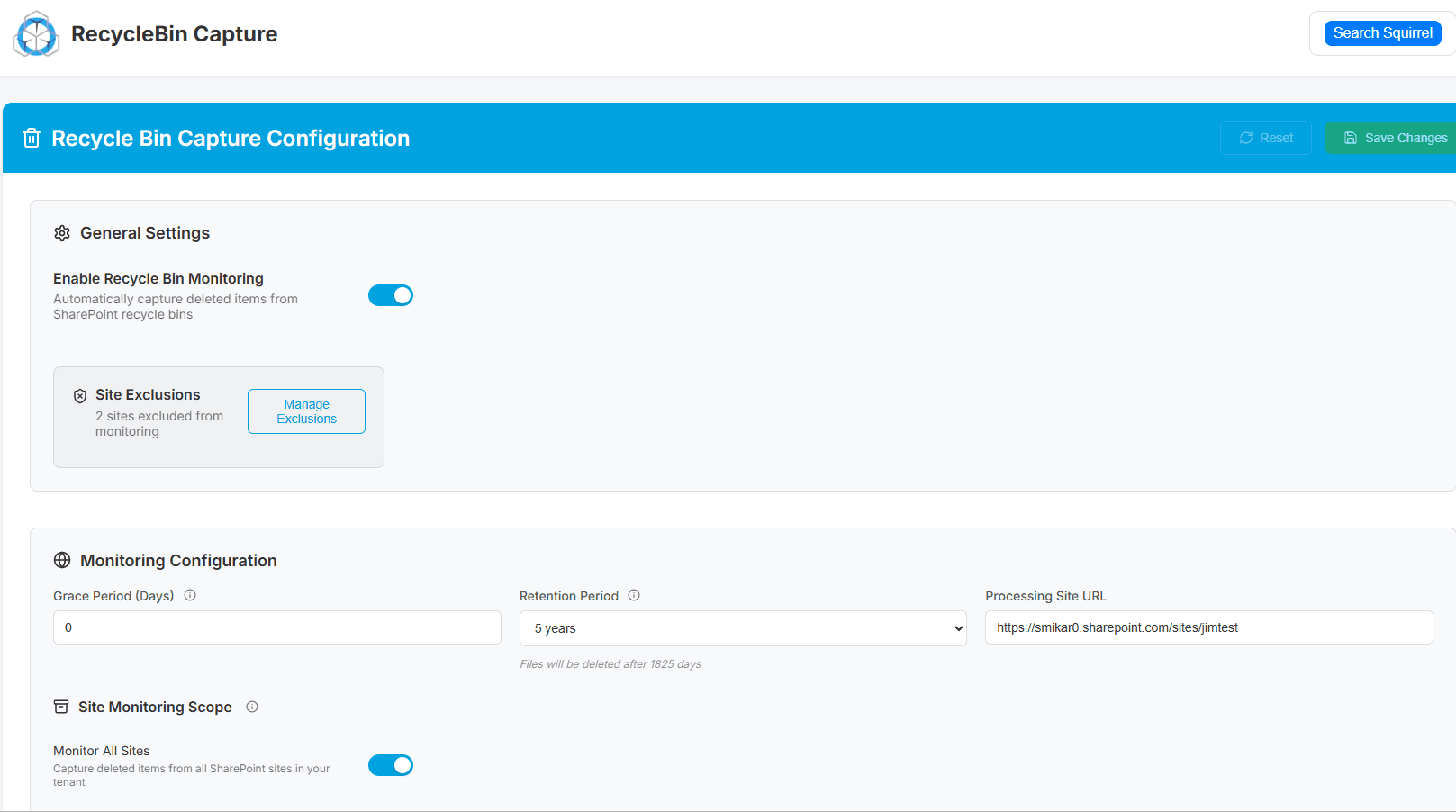
Squirrel has always archived inactive content into low-cost Azure Blob storage while leaving a stub file behind in SharePoint so users can still open the document as if it were still stored there.
Now, Squirrel adds the ability to intercept deletions.
Recycle Bin Monitoring (New Feature)
When enabled:
- A user deletes a file in SharePoint.
- Squirrel detects the deletion.
- Squirrel archives the file directly to your Azure Blob storage, under your retention policies.
- Squirrel leaves a stub behind in SharePoint so users can still open the file in the same way as before.
The result:
- The file is still retained (compliant)
- The file is still accessible (stub handles retrieval)
- But SharePoint never stores it in the PHL
- Storage stops growing
- Costs drop to a fraction of what they were This does not disable retention.
This does not circumvent compliance.
This simply changes where the retained file lives. Instead of being stored in Microsoft’s high-cost SharePoint database tiers, it is stored in your much cheaper Azure Blob storage, fully controlled by you.
Why This Is the Correct, Safe, Long-Term Strategy
This approach:
- Respects retention rules
- Preserves audit and discovery access
- Prevents storage blowouts
- Avoids manual cleanup cycles
- Does not require retraining users
- Does not change how people interact with files Nothing about how users work changes.
Nothing about your compliance posture changes.
Only the storage location changes - and the cost of that storage drops dramatically.
Summary
| Challenge | Why It Happens | Impact | Squirrel’s Solution |
|---|---|---|---|
| SharePoint storage keeps increasing | Deleted/modified files are preserved in PHL under retention | Tenant exceeds storage allocation and incurs monthly costs | Intercept deletions and archive files to Azure Blob |
| Cleanup does not reduce storage | Retention requires files to be preserved | Storage goes up, not down | Squirrel prevents files from entering PHL |
| Need to retain access and audit history | Compliance requires recoverability | Cannot bulk delete safely | Stub files maintain access while storage moves to Azure |
The Preservation Hold Library in OneDrive
The Preservation Hold Library is not exclusive to SharePoint sites. Every OneDrive for Business account is technically a SharePoint site collection under the covers, so the same Preservation Hold Library mechanism applies to OneDrive too. When a Microsoft Purview retention policy targets OneDrive for Business, deleted or modified content in each user's OneDrive is copied into a hidden Preservation Hold Library specific to that user's OneDrive site collection.
The operational consequence is identical to SharePoint: content the user thinks they deleted actually persists in a hidden library, consumes storage against the tenant's OneDrive quota, and remains there for the duration of the retention period. For tenants with high user turnover, the aggregate OneDrive Preservation Hold Library across every user account can be a substantial storage line item on its own - separate from SharePoint site collections.
Two practical implications:
- Departed users' Preservation Hold Library content stays in the OneDrive site collection until either the retention period expires or the OneDrive site is decommissioned. For departed-user data preservation before deletion, Chipmunk archives the OneDrive content (including its Preservation Hold Library content) into customer-owned Azure Blob Storage before Microsoft's deletion timelines apply.
- OneDrive Preservation Hold Library visibility works the same as SharePoint - only Site Collection Administrators can see the OneDrive site's Preservation Hold Library, not the user themselves.
For the broader OneDrive licensing and storage-enforcement picture in 2026, see OneDrive quota enforcement (MC1310684) - Microsoft is tightening the rules on over-quota OneDrive accounts from July 2026, and Preservation Hold Library growth compounds that pressure.
Frequently Asked Questions
Q: Why does SharePoint storage increase even when files are deleted?
A: If retention policies or legal holds are active, SharePoint cannot permanently remove content. Instead, deleted files are copied into the Preservation Hold Library, which still consumes storage.
Q: Where is the Preservation Hold Library and why can’t users see it?
A: The PHL is a hidden system library. It is only visible to Site Collection Administrators and does not appear in normal document library views. Microsoft hides it to prevent accidental modification or deletion of retained records.
Q: Does emptying the Recycle Bin remove the files from the Preservation Hold Library?
A: No. The Recycle Bin is only the first stage of deletion. If retention is enabled, the file is preserved in the PHL even after the recycle bin is emptied. Storage usage does not decrease.
Q: If we turn off retention policies, will the PHL empty itself automatically?
A: No. Disabling a retention policy does not purge existing retained data. The files remain until the retention period expires or they are removed using a controlled remediation process.
Q: Can we delete or purge the Preservation Hold Library to reclaim storage?
A: Not while retention applies. Purging data still under retention is a compliance violation and can expose the organisation to legal and regulatory risk.
Q: Why does deleting old project sites or folders sometimes increase storage?
A: Because deleting large amounts of data triggers large batch preservation events, which can cause the PHL to grow significantly, especially when multiple versions of files are retained.
Q: Can we still meet legal and regulatory retention requirements if we archive data outside of SharePoint?
A: Yes, as long as the archived data is stored in a compliant, tamper-resistant, and retrievable format. Squirrel preserves metadata and access integrity while storing files in your Azure Blob Storage, which meets retention requirements.
Q: How does Squirrel prevent the Preservation Hold Library from growing?
A: Squirrel’s Recycle Bin Monitoring intercepts deletion events. Instead of letting the file fall into the PHL, Squirrel archives it directly to Azure Blob Storage and leaves a lightweight stub file in SharePoint for seamless access.
Q: Do users still access archived or deleted files in the same way?
A: Yes. When users click the stub in SharePoint, Squirrel retrieves the file from Azure and opens it normally. There is no change to user workflow and no retraining required.
Q: How much can we reduce storage costs by archiving instead of using the PHL?
A: Typically 20 to 100 times less, depending on the Azure storage tier. SharePoint storage overages are costly, while Azure Blob Storage is designed for long-term, low-cost retention.
Q: How do I access the Preservation Hold Library in SharePoint?
A: As a Site Collection Administrator, navigate directly to https://[tenant].sharepoint.com/sites/[sitename]/PreservationHoldLibrary. The library does not appear in normal navigation - Microsoft hides it from standard document library listings so end-users can't accidentally interact with retained records. If you're not a Site Collection Administrator, you cannot access it.
Q: Where is the Preservation Hold Library located?
A: Each SharePoint site collection with active retention has its own Preservation Hold Library at the site collection root. There is no single central location - if you have 500 sites under retention, you effectively have 500 Preservation Hold Libraries. OneDrive for Business accounts each have their own too, since each OneDrive is a site collection under the covers.
Q: How do I find the Preservation Hold Library if it's not visible?
A: The Preservation Hold Library only appears if the site is under a Microsoft Purview retention policy or label. If a site has no active retention, the Preservation Hold Library does not exist for that site and there is nothing to find. If retention is active but you still can't see the library, confirm your role is Site Collection Administrator (not just Site Owner) and try the direct URL above.
Q: Does the Preservation Hold Library count against SharePoint storage?
A: Yes. Preservation Hold Library content consumes the same SharePoint Online storage quota as active document libraries, at the same $0.20/GB/month overage rate above the tenant entitlement. This is one of the most common causes of unexpected storage overage charges because Preservation Hold Library growth is invisible to end-users and most admins.
Q: Can I delete the Preservation Hold Library?
A: Not while retention policies are active on the site. Deleting or purging retained content is a compliance violation and can expose the organisation to legal risk. Content only becomes eligible for removal when the retention period expires - and even then, the removal happens automatically, not through a manual delete action.
Q: How do I disable the Preservation Hold Library?
A: The Preservation Hold Library itself cannot be disabled - it is a system-created library that only exists because a Microsoft Purview retention policy or retention label is active. To stop the Preservation Hold Library from accumulating new content, either remove the retention configuration from the affected sites, or replace the retention pattern with an archive mechanism that doesn't inflate SharePoint storage. See how to replace the SharePoint Preservation Hold Library for the operational pattern most enterprises land on.
Q: How do I remove the Preservation Hold Library from a site?
A: The library is created and removed by the SharePoint platform in response to retention configuration. When retention is fully removed from a site AND all retained content ages out or is purged through Microsoft's process, the library is eventually removed by SharePoint. Direct admin removal of the library is not supported and is not the right operational move regardless.
Q: Who can access the Preservation Hold Library?
A: Only Site Collection Administrators. Site Owners, Members, and Visitors cannot see the library - it is hidden from standard navigation and view-selection dropdowns. Microsoft Purview eDiscovery search can retrieve Preservation Hold Library content for authorised compliance investigators.
Q: Can I restore files from the Preservation Hold Library?
A: Site Collection Administrators can restore individual items from the Preservation Hold Library to the original location by opening the file and using "Copy to" or "Move to" back into the source library. However, the copy in the Preservation Hold Library remains until the retention period expires - restoration is a copy operation, not a move.
Q: How does the Preservation Hold Library work?
A: When a user changes or deletes content that is subject to a Microsoft Purview retention policy or retention label, SharePoint intercepts the action, copies the original content into the site's Preservation Hold Library, and only then completes the user's requested change. The user's view is unaffected - the file appears deleted or modified as expected - but SharePoint has silently preserved the original in the hidden library for the duration of the retention period. This mechanism is per-site and applies uniformly to all content in the site that matches an active retention configuration.
Stop SharePoint Storage Blowouts Caused by the Preservation Hold Library
Squirrel intercepts deletions before SharePoint can store them in the Preservation Hold Library, archiving the file to your Azure Blob storage instead. Retention is preserved, access is maintained, and storage costs drop dramatically.
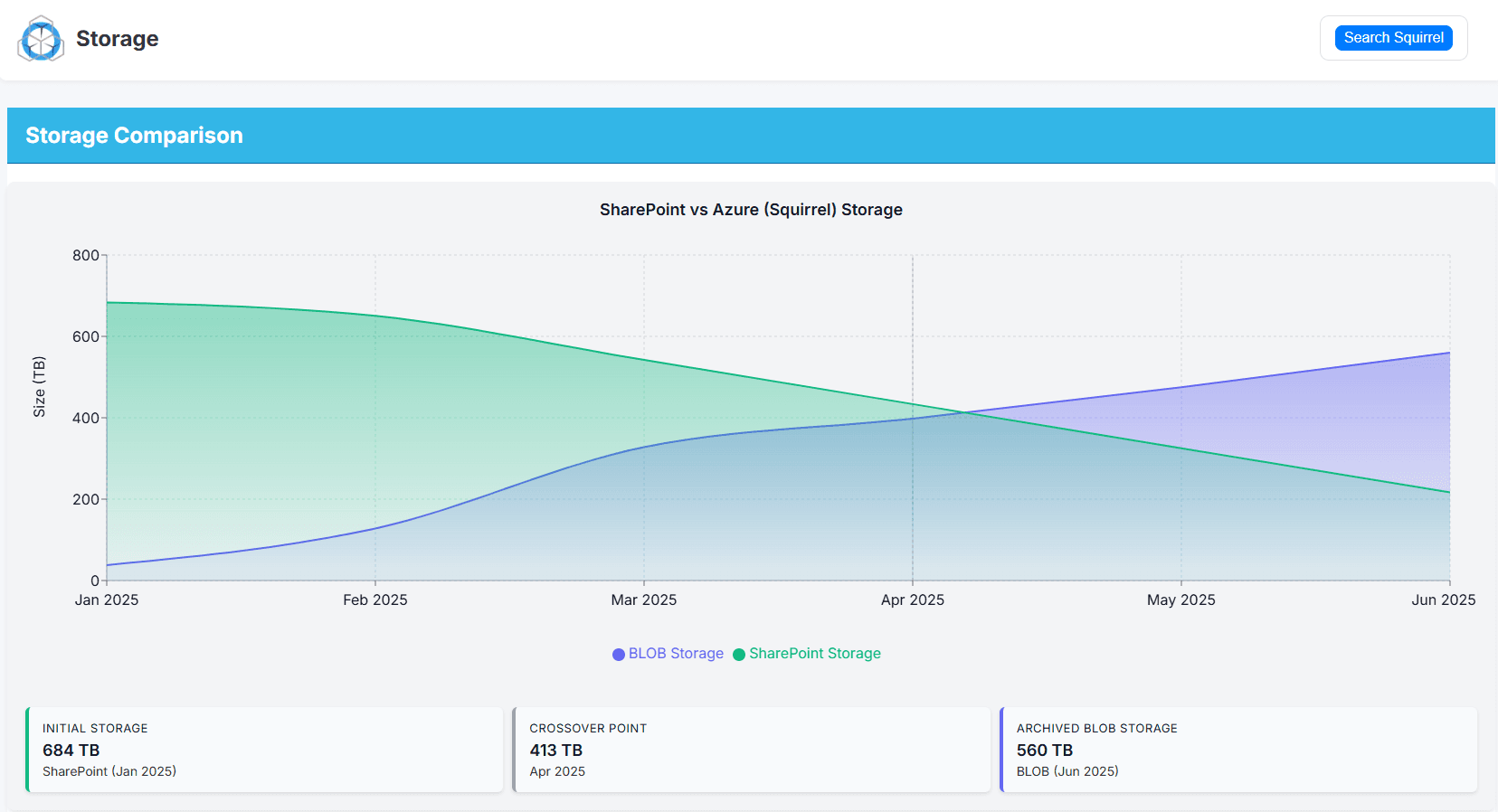
With Squirrel’s Recycle Bin Monitoring, deleted and modified files are captured and archived automatically - preventing the Preservation Hold Library from silently consuming expensive SharePoint storage.
Retention Without the Storage Cost
Related guides on the SharePoint Preservation Hold Library
- How to reduce SharePoint Preservation Hold Library storage costs - the CIO-level playbook for managing PHL cost growth without breaking retention compliance.
- How to set up a Preservation Hold in SharePoint with Microsoft Purview - the step-by-step setup guide.
- SharePoint storage limit warning - avoid Microsoft overage charges - what to do when PHL growth pushes your tenant over its quota.
- Squirrel Recycle Bin Capture - the product that captures deleted content before it lands in the PHL.
Want to reduce your SharePoint Storage costs?
Mark Smith co-founded SmiKar Software in 2015 and has spent the past decade helping organisations solve Microsoft 365 data management challenges. He works with the SmiKar team to build solutions for SharePoint archiving, storage optimisation, governance and compliance, supporting customers from growing businesses through to Fortune 500 enterprises.
More about SmiKar